

Mohon komen di sini! ()


PES 2011 Apk Data

PES 2012 Apk Data Full !! To be able to play this game, you must first install the file. Apk her. If so, you can copy and paste the data folder "com.konami.pes2012" to sd card - android - data. Next, run his game PES 2012.

Grand Theft Auto III

Play Station dan PC datang ke perangkat Android. Permainan ini adalah GTA 3 APK, bukankah San Andreas atau GTA 4. Tapi jangan salah, game ini kita disajikan dengan tampilan yang tidak kalah dengan versi terbaru dari GTA lainnya. di gta 3 kami bermain seorang pria yang dapat kami bermain bebas. seperti kehidupan nyata,

Modern Combat 3 – Fallen Nation v1.1.1 Apk + Sd Data [Game] [Update]

• Yang paling dalam dan paling intuitif gameplay FPS pada smartphone ditingkatkan sekali lagi, sekarang dengan sprint dan fitur slide.• Menatap pada next-gen GFX yang memungkinkan untuk render belum pernah terjadi sebelumnya lingkungan.• Peningkatan SFX dan suara akting akan membuat Anda tenggelam dalam skenario apokaliptik.

Assassin Creed

Bermain sebagai Ezio dan Altair pada dua waktu yang berbeda dalam sejarah besar Konstantinopel dan mengungkap rahasia utama Persaudaraan kaum pembunuh '. Hilangkan banyak musuh berbahaya berkat berbagai langkah pembunuhan dan trik. Merekrut pembunuh

Resident Evil

Ini sebuah berita besar bagi setiap penggemar Resident Evil, yang survival horror franchise game terkenal sekarang tersedia di platform Android.

Tampilkan postingan dengan label APK. Tampilkan semua postingan

Photo Locker Pro

0 komentar


Description

Hide pictures securely and conveniently in Photo Locker Pro! - The ultimate app for hiding pictures on Android. Photos from your Android gallery can be safely locked away inside Photo Locker and accessible only via a secret PIN code.
Additionally, with Stealth Mode turned on, the Photo Locker app itself can be made invisible and accessible only by dialing your PIN code.
Also, with Stealth Mode enabled, you can access Photo Locker Pro via a Calculator Widget. Key in your PIN code using the calculator widget and tap on the number display to access your Photo Locker! This is useful if you wish to enable Stealth Mode for Photo Locker Pro on a tablet (which has no calling capability).
Key features include:
1)Encryption - hidden photos are not only moved to a secret location but are also encrypted using advanced 128bit AES encryption. This means that even if someone manage to steal your SD card and copy the image files, they will still be unable to view the photos
2)User friendly operation - Easily hide photos via default gallery or from within Photo Locker itself.
3)Bulk hide - hide hundreds of photos at once
4)Folder level locking - lock individual hidden albums
5)Zoom in and out of hidden photos with multi-touch. Hidden photos maintain their original resolution and are not scaled down as in some other photo hiding apps.
6)Rotate hidden pictures left and right
7)Slideshow - Slideshow viewing mode available with customizable delay setting
8)Removed from recent app list - Photo Locker App will not appear in 'recent apps' list
9)Lock on sleep - If you forgot to exit the Photo Locker, the app will lockout as soon as your phone goes to sleep mode.
10)Tablet optimized - Photo Locker's UI has been designed with tablets in mind as well so as to provide the ultimate viewing pleasure on both Android smart phones and tablets
11)PIN recovery - With the optional PIN recovery feature, you won't lose your precious files even if you forgot your PIN code.
12)Easy Un-hide - Un-hide photos just as easily as hiding them and you can decide where the un-hidden photos go.
Download Photo Locker Pro now!
Photo Locker Pro is brought to you by Handy Apps.
Connect with us on Facebook at: https://www.facebook.com/HandyAppsInc




Photo Locker Pro


PlayerPro Music Player

0 komentar


PlayerPro Music Player

BlastOn LLC
(19,115)


Description

The ultimate music player for Android.PlayerPro Music Player is an advanced music and video player for Android 2.x devices.
Key features:
* Browse and play your music by albums, artists, genres, songs, playlists, folders, and album artists.
* Video browser and player.
* Automatically downloads missing album artwork, artist pictures and genre illustrations.
* Manually pick your preferred album artwork, artist pictures, genre illustrations from the Internet, the Gallery app, ID3 tags, or album folder.
* Change the user interface of the Player by installing one of the 18 available SKINS, all for free.
* Customize the layout, chosing between GRID or LIST views.
* Read album and artist REVIEWS.
* Download, search and and save LYRICS to your music files using standard ID3 tags.
* Single and group TAG EDITING: title, album, artist, album artist, track, year, genre, comment. Formats supported: mp3, ogg, flac, wma, wav, m4a, mp4 (provided that your phone supports these formats).
* Mixable AUDIO EFFECTS for Android >2.3 devices: 5 band graphic EQUALIZER with default/customizable presets (edit, rename, delete), STEREO WIDENING effect (virtualizer), REVERB effects (large hall, medium hall, plate, small room, medium room, large room), BASS BOOST effect, volume control.
* Free additional DSP PLUGIN for Android <=2.2 or >=2.3 devices: 10 band graphic EQUALIZER with 15 default/customizable presets, PRE-AMP control, BASS BOOST control, volume control, optional VIRTUALIZER control (stereo widening). GAPLESS playback. Auto/Manual CROSSFADE. Go to Settings > Audio and select "Download DSP pack" option to install the free plugin.
* Dolby and SRS sound effects for HTC devices equipped with HTC sound enhancement (HTC desire HD, etc).
* Music stats and SMART PLAYLISTS: Recently added, Top rated, Most played, Recently played, Least played. Build additional custom playlists using the SMART PLAYLIST EDITOR and the many different criteria it offers: album, artist, title, play/skip count, last played/added, rating, is a podcast, duration, year etc. All smart playlists are AUTO-UPDATED.
* Import and export music history and ratings from your favorite desktop music player: Songbird, Winamp, Windows Media Player, MediaMonkey ...
* Music folder selection.
* Choice of 2 LOCK SCREEN widgets with many customization options: unlock slider, sound toggler, skip tracks using volume buttons, swipe gestures, background selection, controls selection, time display, skin selection ...
* Choice of 5 different home screen WIDGETS (4x1, 2x2, 3x3, 4x4, 4x2). All widgets are customizable and skinnable: 6 different SKINS available, option to display artist picture instead of album artwork, option to display ratings, shuffle/repeat controls etc.
* NOTIFICATION STATUS support: display album artwork, title, album and artist, play/pause, skip forward and stop CONTROLS (ICS only) in notification status.
* Supported SCROBBLERS: Simple Last.fm, Scrobble Droid, Official Last.fm app.
* SLEEP TIMER with fade out.
* SHARE text notifications, album/artist artwork on your favorite social networks: Twitter, Facebook, Gmail, Picassa etc.
* HEADSET support. Customize long press and double/triple press actions.
* Library wide SEARCH. VOICE search support.
* SWIPE gestures (player: swipe album art to skip songs, browsers: swipe left to play next, swipe right to play last).
* SHAKE IT feature: give your phone a shake to play next/previous song (e.g.: shake top to bottom or bottom to top to play next/previous song).
* Create playlist SHORTCUTS.
* APP2SD support.

... and many other features to discover !
Plz check the free 7 day trial version of PlayerPro Music Player.


App Screenshots


PlayerPro Music Player


PocketCloud Remote Desktop Pro

0 komentar


PocketCloud Remote Desktop Pro

Wyse Technology Inc
Top Developer
(4,714)


Description

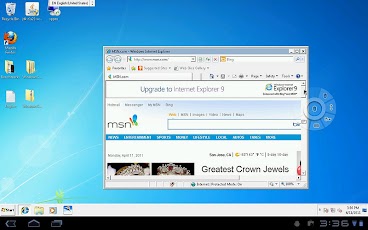
Access your computer, files and desktop apps securely from your mobile devicePocketCloud is a secure and fast way to remotely connect to your Mac or Windows desktop with your Android device, no matter where you are. Access your files, pictures, and applications like Outlook, Word, Photoshop, games or any other program. Simple to install with powerful features, enterprise security and RDP/VNC compatibility, make PocketCloud the best choice for remote desktop access.
☆Named by PCWorld the best mobile cloud app for Android tablets☆
☆Winner of 148App’s Best App Ever Award, For Best Android Remote Access App☆
So leave your laptop behind and don’t be concerned with copying files you need from your desktop. Access them all with PocketCloud—make an important presentation, grab a forgotten report, help a friend with a computer problem, or edit and email a spreadsheet while traveling as light as possible.
Two Easy Setup Options:
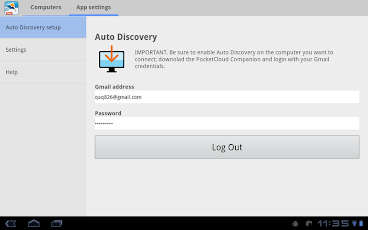
I) Auto Discovery (Recommended): Hassle-free access to your desktops with minimal setup and no technical know-how. Simply install PocketCloud on your Android device and follow the simple step-by-step instructions.
II) Advanced Setup: PocketCloud can also connect directly to machines running RDP or VNC. Simply enter the IP address or hostname to connect.
FEATURES:
✓ OPTIMIZED for Phones and Tablets
+Full multitasking support
+Advanced high-accuracy Touch Pointer for instant mouse and keyboard control
+Native resolution on all Android versions including Honeycomb and ICS
+Keyboard auto-activation
✓ BEST Remote Desktop Protocol (RDP) Android Client
+Always up to date with the latest RDP specification from Microsoft (RDP 7.0)
+Microsoft RD Gateway (TS Gateway) support
+Best compression for 3G and 4G
+Sound with auto-bandwidth mode (Windows Pro, Ult. & Ent. only)
+Enterprise grade security: 128-bit encryption, FIPS and NLA support
+NLA (Network Level Authentication): The only Android app the supports CredSSP including NTLM and Kerberos encryption levels!
+File Redirection
+Auto-fit and custom resolutions for RDP
*RDP Features including sound streaming are not supported on VNC, Mac and Home Editions of Windows
✓ VNC Support
+Connects to Macs, Home Editions of Windows and Linux
+Secure 128-bit encryption when using Auto Discovery
+Supports username authentication for Macs
✓Certified for VMware View
+Direct connections and secure TLS/SSL tunneling
✓ Auto Discovery
+Fast and hassle-free setup using your Gmail account
+Secure tunneling for VNC
+No port-forwarding configuration required
+Great for 3G!
✓ Rich Multi Touch Gestures*
+Left Mouse Click: One finger tap
+Mouse Scroll: Two-finger swipe
+Left Mouse Dragging: Tap and hold, then drag
+Bing Keyboard Up: Three-finger tap
*Requires multi-touch support on the device
✓ Enterprise-class Support
+Wyse is a 28+ year Silicon Valley company
+3rd party app integration (URL scheme)
SUPPORTED PLATFORMS
+Android 2.1 or later
+Windows 7, Windows Vista, Windows XP, Windows 2003* & 2008*
+Mac OS X 10.6 & 10.7
+VMware View 4.5
+Linux: Requires a VNC server installed
Visit our Support Center to view the PocketCloud knowledge base and community forum, or submit a question: http://pocketcloudsupport.wyse.com
keywords: vnc, rdp, remote desktop, remote control, terminal server, VDI, rd gateway, gotomypc, ts gateway, virtual desktop

App Screenshots


PocketCloud Remote Desktop Pro

Senti Wayk

0 komentar


Wayk 4 - Tomorrow's Alarm

senti
(222)

Description

Revolutionary.
Senti Wayk 4Welcome to Wayk 4.9! Update now!
Wayk 5 - Feature Freak - coming soon. It's huge.
Wayk delivers the perfect morning.
"It's part alarm clock, part personal assistant, and we like that." - Alan, Lifehacker
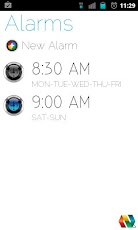
Wayk up to the alarm clock of tomorrow, where you'll quickly fall in love with the wave to snooze, voice response and your morning scoop that brings you your calendar and your news in a sleek style. Now with support for Jelly Bean and Ice Cream Sandwich devices.

Features:
Wave to Snooze* and Intelligent Dismiss*
Pressing a button to snooze? Old school. With Wayk, you just wave your hand over the phone to snooze. Oh, and to dismiss? Wayk will figure it out on it's own. It is a smart phone after all.
The Clock*
Setting your alarm just got real with Senti's designer clock.
Voice Recognition*
Pick up your phone and tell it to "Snooze for 8 minutes", "snooze" or "dismiss".
Google Calendar*
We went ahead and added the ability to sync with your Google Calendar, so you can wake up feeling prepared.
The Scoop*
Choose from feeds such as Engadget, Fast Company and more, so that you’re always in the know on what you need to be.
The Senti Interface*
We focus on high quality minimalist design, so that everything is both sleek and easy to use.

Send us feedback!
We love to hear from you! Send us your thoughts and suggestions, and we'll do what we can to incorporate it into the app!
Twitter: @sentiapps
Email: hello@senti.in

App Screenshots


Senti Wayk download


Skout+ - Meet, Chat, Friend v2.11.4

0 komentar


Skout+ - Meet, Chat, Friend

Skout Inc.
(1,843)


Description

Enjoy the AD-FREE version of Skout, the global network for meeting new people.NO ADS, all fun! Simply download Skout+ and your existing Skout account, profile and chats will automatically carry over.
Instantly meet people near you or around the world. Discover new friends at a local bar or in Barcelona. Millions of people are connecting and meeting through Skout every day. Use exciting in-app features to increase your chances of friending or chatting!

Expand your social network with the tap of a button. It’s so much fun, you won’t be able to stop. Start Skouting and find your party, make new friends, or meet new people, anytime, anywhere.
Features: Meet people by preference and proximity, chat, see who checked you out, get updates from nearby users, buy and send gifts, save your favorite users, browse profiles and pictures, promote your profile with in-app features, earn points to unlock premium features.
Download and join the Skout party now!
Not ready to buy? Search “Skout” and download the FREE version.
Please note: We take your privacy very seriously. You’re always in complete control – your exact location and personal information will never be given without your permission. YOU decide if, when, and how you want to connect.


App Screenshots


Skout+ - Meet, Chat, Friend v2.11.4

Adobe_Flash_Player_11

0 komentar


This update to Adobe Flash Player 11 includes compatibility with Android 4 supported devices, performance improvements and bug fixes related to security and stability. The complete set of release notes can be found at: http://adobe.ly/H0xv8K.
Overview:
*** NOTE: FLASH PLAYER IS NO LONGER BEING UPDATED FOR NEW DEVICE CONFIGURATIONS. FLASH PLAYER WILL NOT BE SUPPORTED ON ANY ANDROID VERSION BEYOND ANDROID 4.0.x ***
While Flash Player remains on Google Play for installation on Android devices that are certified by the manufacturer, installing Flash Player on an uncertified device may result in unexpected behavior and can potentially destabilize your device.  A list of certified devices can be found at http://www.adobe.com/go/certifieddevices.  Flash Player WILL NOT be supported on any device shipped with or upgraded to an Android version beyond Android 4.0.x
By clicking “Install” I agree to the License Agreement terms at http://adobe.com/go/eum. Manage your privacy settings at https://settings.adobe.com/flashplayer/mobile.
Flash Player 1Flash Player 2


Adobe_Flash_Player_11


Super Keyboard Pro

0 komentar


Super Keyboard Pro

Beautiful Apps LLC


Description

Super Keyboard is a better keyboard replacement/alternative for android!=Compatible with Android 4.1 Jelly Bean=
Super Keyboard is a better keyboard for your android phones and tablets! We are dedicated in making Super Keyboard the best keyboard for android.
TOP FEATURE
- Smart proximity error detection and correction, help you type faster than using any other keyboards,
**TRY IT OUT YOURSELF**
- True multi-touch capable
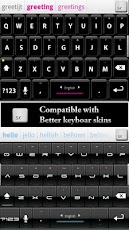
- Large keys! You can even make them taller if you want.
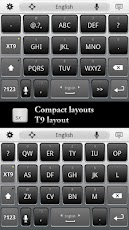
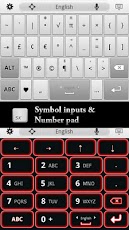
- Enhanced layouts for both phones and tablet devices: includes compact and T9 layouts for phones and
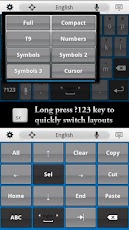
split layout for tablets. **Press and hold ?123 key to quickly switch between layouts**
- Themes! Compatible with many keyboard theme format: GO Keyboard, Better Keyboard, Smart Keyboard, ultra keyboard, etc

- Customizable keyboard background, set your keyboard background to any image you like
- Support many languages, more are coming soon
- Customizable fonts and color, compatible with all font packs on the android market.
You can also load fonts from your sd card.
- Alien Text: find it under ‘General Setting’ -> ‘Alien Text’
- Enhanced setting, customize your keyboard the way you like it: gesture, keyboard size,
user dictionary and sound

Supports Languages:
Czech, Simplified Chinese, Traditional Chinese, Danish, Deutsch, English, Espanol, Finnish, French, Hungarian, Italiano, Japanese, Korean, Netherlands,
Norwegian, Norwegian (Bokmål), Polish, Portuguese, Russian, Slovenian, Swedish
Permissions explainations:
SD Storage - download additional contents, such as theme files
Internet Access - check latest update, notification when new version is available
Read contact - contact dictionary: suggest names from user contacts

App Screenshots


Super Keyboard Pro


Smart RAM Booster Pro

0 komentar


Smart RAM Booster Pro

Root Uninstaller


Description

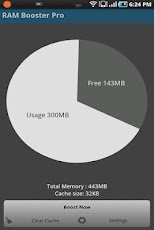
The most beautiful part of this app is a small, configurable widget that places on top of any app and one-click to RAM boost.Recommended by AddictiveTips.
Hotest Apps by AppBrain.
Most of Android devices bundle with limited memory. Android task manager will selectively kill low priority tasks in order to reserve memory to higher priority task. That’s not always run at an appropriate time, causing low responsive apps, lagging, especially when you launch a new app after heavily browsing web pages. It causes a worse experience.

How RAM Booster works
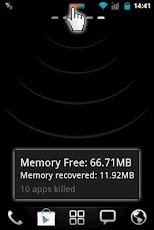
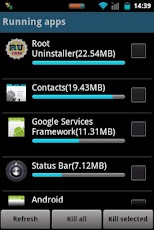
RAM Booster is designed to overcome these issues by selectively kill less important apps that are running in the background but consumes considerable device’s memory.
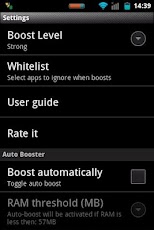
RAM Booster comes with auto-boost in 4 levels: aggressive, strong, medium, gentle.
☆ Aggressive: kill most of low priority apps
☆ Strong: Kill apps that is low priority as well as consume lightly below an “average”
☆ Medium: kill apps that consumes memory above an “average”
☆ Gentle: kill only apps that uses considerable memory
“Average” is evaluated real-time based on running apps and change over time.
How to work RAM Booster
There are 5 ways to boost
☆ Auto-boost: boost automatically under RAM available & timing conditions
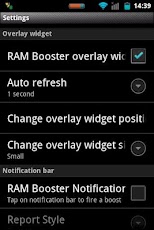
☆ Overlay widget – Enable RAM Booster overlay widget (on by default), adjust widget’s position, and tap on widget to boost anytime you want
☆ Home screen widget – one tap to boost (long-press your home screen>Widget to add RAM Booster widget)
☆ Notification bar – one tap to boost (toggle notification bar visibility in app’s setting)
☆ Boost Now – tap this button from app’s main screen
Tool:
☆ 1-click cache cleaner

There are plenty options from app’s settings to twist boosting process:
☆ Boost level: select a boost level
☆ Nice themes at your choice
☆ Whitelist apps: apps will not be killed when boosting
☆ Boost automatically: auto-boost, come with minimal RAM threshold and Boost interval
☆ Report style- define how to show reports
☆ Feedback- a haptic feedback when touch on boost widget
☆ Overlay widget position/size - Change overlay widget position/size
☆ Overlay widget transparency- Change transparent/opaque level
☆ OnClick/OnLongClick options for overlay widget
kw: ram booster, memory booster, battery saver, ram manager, memory manager, boost, faster app, smart battery, task killer, ATK, fast reboot, one tap, 1-click clear cache, floating widget

App Screenshots


Smart RAM Booster Pro


TuneWiki Pro

0 komentar


TuneWiki Pro

TuneWiki


Description

Play your music with scrolling lyrics!The only music player where you can get, share and talk about lyrics and music.

TuneWiki Pro is the Ad-Free version of TuneWiki's award winning music player!

* Listen to any music with scrolling lyrics
* Share lyrics from your favorite songs to Facebook & Twitter
* Get lyrics instantly translated into 40+ languages
* Share Photos from your gallery.
* Free, unlimited SongID with synced lyrics
* Discover new music – songs that are being played and recommended by your friends
* Create, manage, and edit playlists
* View and edit detailed tag info for artists, albums and songs
* Supports installation to SD card. Please note that due to restrictions within the Android OS, the widget will be disabled when the app is on the SD card.
*Verizon users, please contact ideas@tunewiki to share your feedback with us vs. writing reviews here so we can discuss.
* TuneWiki Pro is ads free for Android phones. Available now in Google Play!

App Screenshots


TuneWiki Pro


V Radio Recorder

0 komentar


V Radio Recorder

iNOV


Description

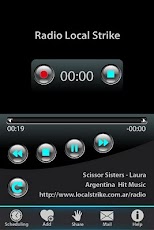
V Radio Recorder-application to listen to radio stations of the world.You can:-Rewind or Move forward the radio stream
-Move backwards the radio stream and record what you have just listened to
-More than 2000 radio stations of all the world, and npr
-Record the radio stream
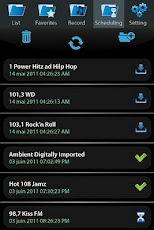
-Schedule the radio recordings

V Radio Recorder contains:
- Dictaphone.
- You can listen to a large choice of radios of all over the world.
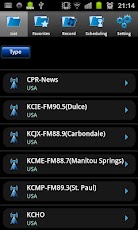
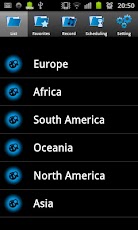
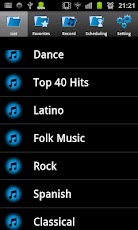
- Search the radio by Country, by Type or by Station name ou the 3 at the same time.
- Add the radio station to favorites.
-You can pause the direct and then resume playing the broadcast from the time you paused the station or you can move forward or backward the radio stream along the period from the beginning up to the direct
- Record the radio.
- Combine the Rewind/Forward and Record :
Example : You can listen to the radio during 10 minutes and rewind to launch the recording of what you are interested in.
- You can listen to your favorite radio station in the background and use your telephone normally (sms, mails, games, applications).
-Shedule the recordings
- Share your favorite radio station with others via Facebook, E-mail, Twitter and so on.
We are looking forward to improve our application, please send us your feedbacks, your recommendations and the name of the radio stations that you want to add.
The list of radio station is updated continually; please press the button Update List above the stations list. You will have the access to new radio stations added.

App Screenshots


V Radio Recorder


unity © 2011 Design by Best Blogger Templates | Sponsored by HD Wallpapers